A Powerful Data Import Engine to Boost Your Digital Audit Efficiency
In the field of digital auditing and computer-assisted audit techniques,
data sources are diverse and formats vary. JCAATs provides a powerful
data import engine to help users consolidate information from various sources,
accelerate verification and analysis processes, and significantly enhance work efficiency.
📁 Supported File Formats
JCAATs supports structured, semi-structured, and unstructured data formats.
It can easily handle any data, regardless of its source:
| Data Type |
Example |
| Structured File |
CSV, TXT, XLS, XLSX, ODS |
| Semi-structured File |
JSON, XML, HTML, HTML Table |
| Unstructured File |
PDF, PDF Table |
JCAATs features built-in intelligent parsing for the following formats,
a capability rarely found in most traditional CAATs tools:
- ODS: Import without conversion. Cross-platform support.
- JSON: Automatically convert tables, process invoices and API payment data.
- PDF Table Recognition: Auto-capture, boost efficiency.
- HTML Table Analysis: Direct conversion of website data.
🏆 Success Case: Large Accounting Firm
🗣️ "Before, we had to manually input data from PDF files. Now, with JCAATs' automatic recognition, we can import and compare over 300 files in just a few minutes."
🧠 Key Features
-
Patent Data Protection:
Protected by a Taiwanese Invention Patent (Patent No. I889623),
demonstrating our technical innovation and reliability.
-
Data Import Wizard:
Users can quickly complete data import with just a few simple steps,
without any complicated setup.
-
PDF Table Auto-Recognition:
JCAATs can automatically extract data from PDF forms and text documents
without requiring manual copying or conversion.
-
HTML Table Analysis:
Automatically extract table content from web pages,
making structured web data analysis simple and efficient.
-
Smart Encoding Identification:
Automatically recognize multilingual and heterogeneous system encodings,
effectively solving data import obstacles caused by encoding errors.
-
Semi-structured File Normalization:
Supports automatic creation of parent-child hierarchies and foreign key relationships
for semi-structured data such as JSON and XML, facilitating data fusion and comparison.
-
Data Fusion with One-Click:
Multiple files can be imported at once, and data of the same format can be merged,
significantly improving data preparation efficiency.
-
Smaller and more secure data files:
Using non-cleartext storage and compression encoding,
our data files are reduced to less than 1/5 the size of traditional CAATs files,
while also strengthening data security.
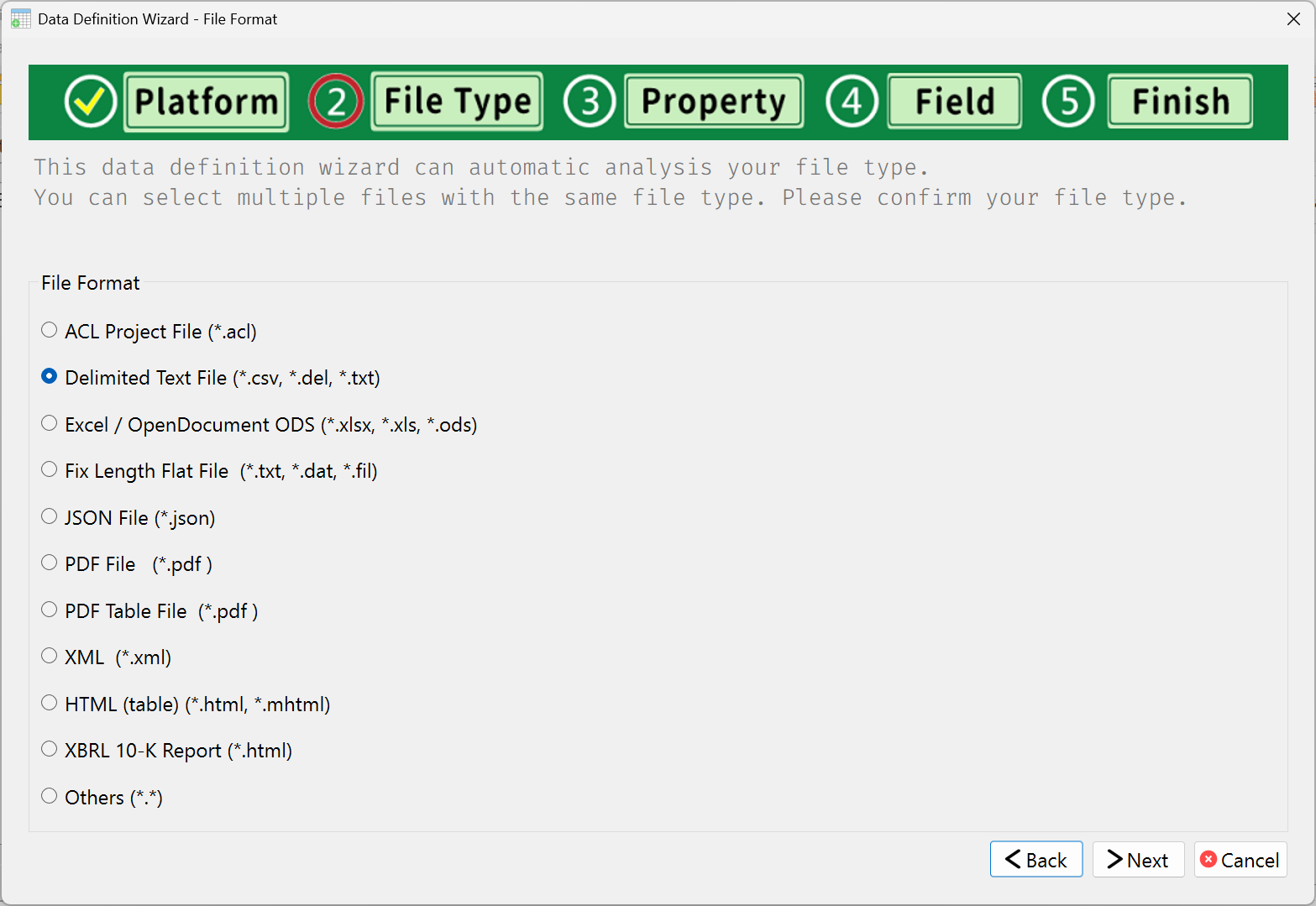
🖥️ Data File Connector Interface Showcase
It is the “Select File Type” interface for the JCAATs data import tool,
supporting various primary and advanced data formats.
Users simply select the corresponding type to proceed to the next step
for data feature analysis and field definition.
🌟 User Feedback and Cases
🏆 Success Case - Motor Vehicle Office
🗣️ "With JCAATs, one person can now audit regulatory big data,
a task that previously required three people.
This change not only saves manpower but also cuts processing time by over 70%."
🏆 Success Case - Global Manufacturing Audit Office
🗣️ "We spent three days each month manually consolidating XLSX, CSV, and ODS data
from our international subsidiaries. Now, with a single click,
we can automatically merge all data, significantly improving our audit accuracy and timeliness."
🏆 Success Case - Financial Holding ESG Office
🗣️ "Tracking ESG data was a huge struggle for us. But
JCAATs' PDF import feature lets us extract key disclosure narratives
from ESG reports and provides risk analysis summaries.
This has significantly boosted both our efficiency and insights."