AI Tool for Audit Text Data Extraction
JCAATs' OCR data integration module is designed for auditors and
internal control personnel, effectively solving practical pain points such as
"non-uniform format", "multiple pages", "sensitive data", "incorrect field alignment",
and "mixed languages", breaking through the limitations of traditional CAATs.
🧠 OCR Features and Technical Highlights for Audit Operations
-
Visualized Operation Interface:
Graphic step-by-step guidance simplifies OCR data integration,
enabling non-technical background users to quickly get started
and efficiently process data.
-
Intelligent Source Detection:
Automatically detects whether a PDF is a scanned document, image file or
printed document, and dynamically determines whether to use OCR or not,
avoiding misjudgment and resource waste.
-
Multilingual and Bilingual Recognition Support:
Supports over 100 language models, including Traditional Chinese,
English, and more, allowing for simultaneous recognition of main and
secondary languages for bilingual file recognition.
-
Multi-page Merge Output:
Supports merging multiple PDF pages into a single data table, solving the
pain point of most market tools only supporting one page per file.
-
Customizable Field Correction Module:
Users can define correction rules based on table characteristics, using JCAATs commands
and Python scripts, to achieve more accurate recognition.
-
Local Processing, Zero Data Leakage:
OCR processing is performed locally on the user's computer, with
no need to upload data to the cloud, ensuring secure processing of
sensitive financial data.
-
Traditional CAATs Lack This Functionality:
Most traditional CAATs tools do not have OCR recognition and multilingual support,
making JCAATs a more comprehensive solution for intelligent auditing needs.
📌 Feedback: No more retyping data from scanned documents or printable PDFs.
"We used to struggle with scanned documents or printable PDFs, but now with JCAATs OCR module, we just need to upload the file and press a few buttons, and the data will be ready."
— Provided by an Auditor From a Medium-sized Accounting Firm
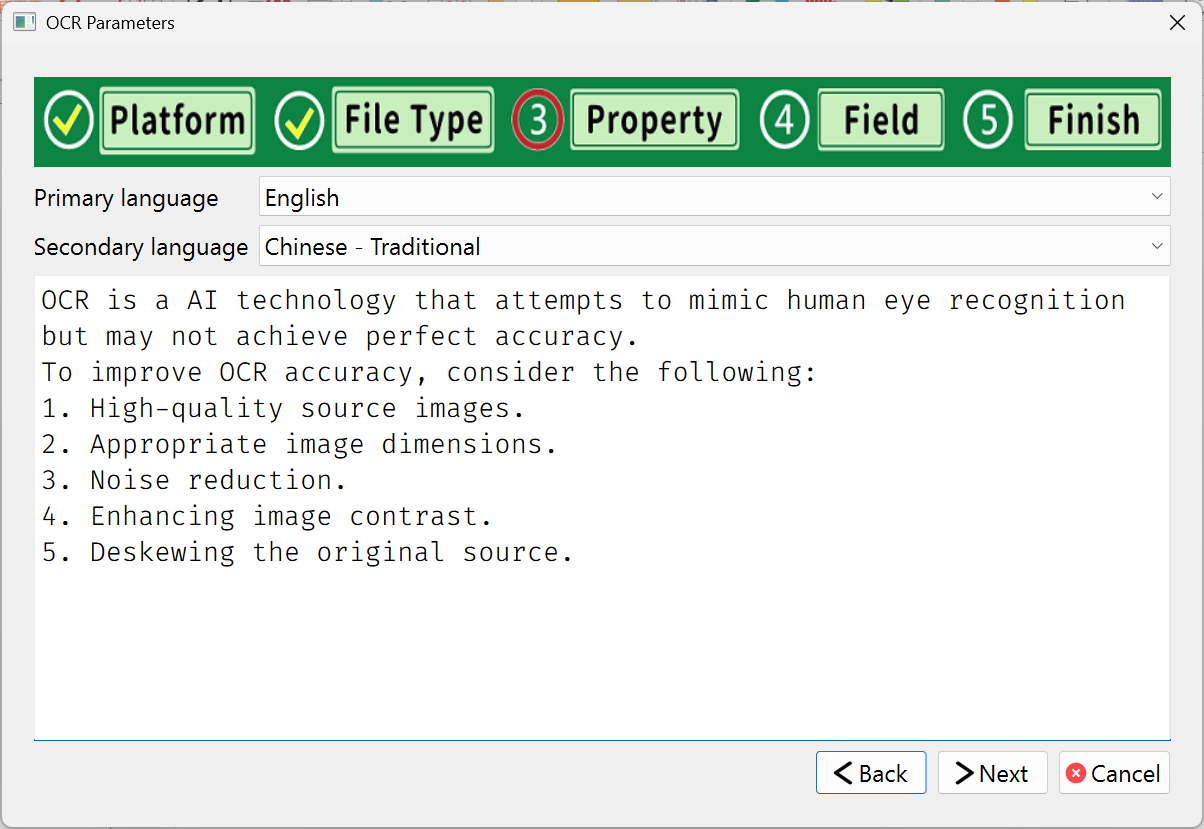
🖥️ JCAATs OCR Data Connector Interface
The JCAATs OCR module adopts a modernized operation interface, with all steps visually designed
to present the data recognition and import process. Users only need to select the file,
set the language, and the data will be automatically recognized and imported into JCAATs,
making it easy for auditors to prepare data.
🌟 User Feedback and Cases
"The biggest surprise is that it not only performs OCR, but also knows which parts are field names and which parts are content, and can correspond to the correct ones perfectly!"
— Provided by an Auditor From a Medium-sized Accounting Firm
"The visual interface lets me organize reports without writing code, saving me a lot of time every month-end."
— Provided by an Auditor With a Non-Technical Background
📌 OCR Tips: How to Improve Recognition Accuracy?
OCR is an AI technology that uses machine learning to recognize text in images, but it is limited by the quality and structure of the original image. While it can't guarantee 100% accuracy, following practical tips can effectively improve OCR recognition quality:
- 🔍 Use high-quality original images to avoid blurry or overly compressed files
- 📐 Maintain reasonable image dimensions, with font sizes not too small
- 🧹 Perform noise removal or background noise processing
- 🌑 Improve image contrast to make text edges clearer
- 📏 Correct for skewed angles to avoid OCR misrecognition of skewed text
By combining the above pre-processing techniques with JCAATs' OCR module, the recognition accuracy of scanned documents and photo-like PDFs in auditing scenarios can be significantly improved.